Marketing ROI What-If Simulator
Campaign performance by channel plus a budget what-if slider.
01Business problem
Marketing could see past spend and leads but had no way to model how a budget change would affect projected revenue before committing the money.
02Approach
Spend, leads, conversions and revenue were modelled per channel. A what-if parameter drives a budget multiplier in DAX, so the projected revenue and ROI update live as the slider moves.
03What's inside
- Spend, leads, CPL, conversions and ROI by channel
- What-if budget slider (−50 % to +100 %)
- Projected revenue vs current
- Campaign-level table with conditional formatting
04Insights & outcome
Lets the team test budget scenarios in the meeting instead of requesting a new analysis for each one.
Need a Power BI report like this for your business?
Send me your data and the questions you need answered. I confirm scope, timeline and a fixed price before any work starts; typical dashboard delivery is 1–3 days.
More in Sales & Marketing
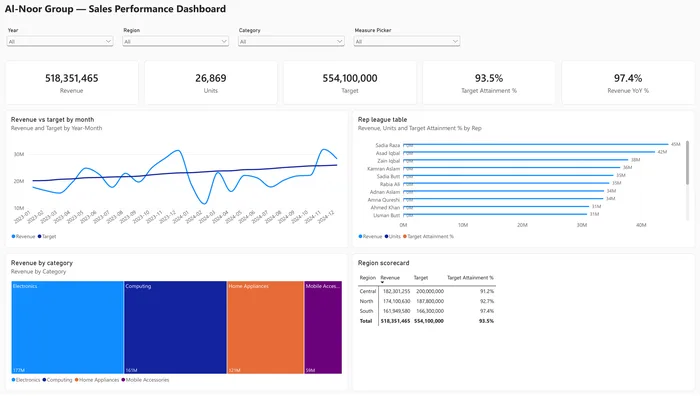
Dynamic Sales Analysis
Field parameters let users switch metric and dimension themselves; KPI cards, trends and drill-through to order detail.
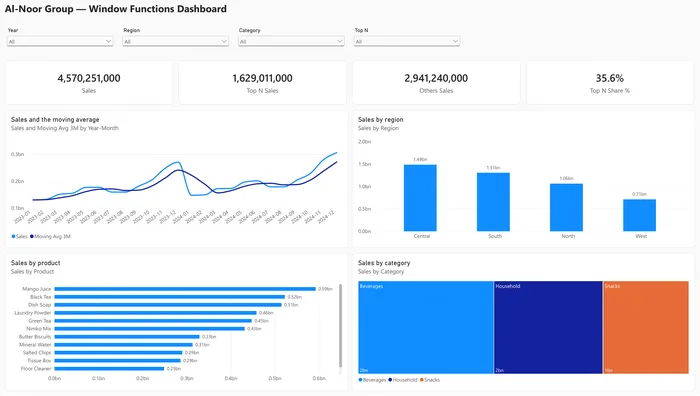
Advanced DAX Window Functions
OFFSET, WINDOW, INDEX and RANK for month-over-month change, running totals and top performers.
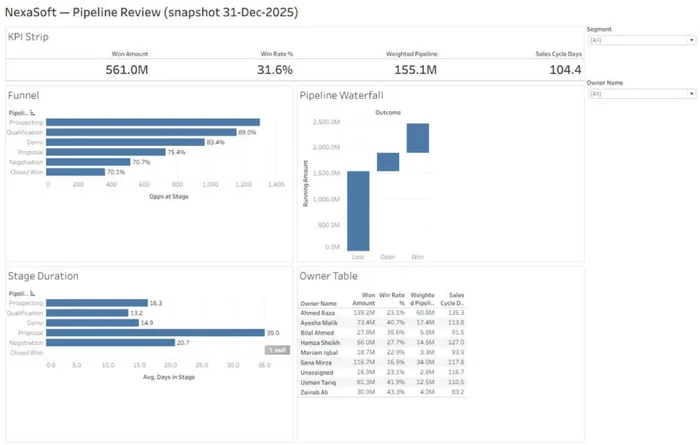
Sales Pipeline & Rep Performance
Pipeline review: won amount, win rate, weighted pipeline and sales-cycle days by segment.